
Token Counter Go Brrrr
The IDE I’m using is called Zed, and it has a real-time token monitor. According to Zed, the count is not 100% accurate. But quibbling about the token count being 30% off or what the token count even means isn’t important for this article.
I’m a big fan of Zed IDE since switching fully over to it earlier in 2025. It’s super fast (written in Rust), has a fantastic AI/LLM support and has the standard IDE workflows from VSCode/Webstorm.
Zed has a counter on the top right hand panel which shows the token limit available. For this article I’m using Claude Sonnet 4 through Copilot. The allocation is 128k tokens.
I started off a new chat with the Agent in Zed, and issued my shoddy instructions. Create some unit tests. Use Jest.
At first, the Agent started off positively. The Agent started creating files and impressing me with plans of what it would do. I felt safe knowing that “it” knew what to do and that I didn’t actually need to give it some more prompts.
I was about to concentrate on another tab in the IDE, when I noticed something fascinating. The token allocation was incrementing rapidly - by almost 1,000 every 10 seconds. It was like watching the LED display of a digital kitchen weighing scale as you slowly drop raisins onto it.
Things started to go wrong around 8k tokens into the experiment. Some tests were failing. The Agent reassured me that now it understood where it went wrong and could fix the issue. After a few more tries, it fixed the issues. It even requested my permission to run chmod +x on a file. I made a mental note to check later why this was necessary.
By now I was hooked. I wanted to watch what it did next. This was a bit of a stretch goal for Claude Sonnet 4 — the files it was creating unit tests for were reasonably complicated to work with, using a cloud provider’s SDK.
As I continued watching, transfixed, the Agent did something impressive. It said it needed to read the other files and create tests for those, to make sure those files maintained their correctness. My human brain couldn’t quite grasp what was going on - why didn’t it just make its tests follow the conventions of the existing tests. But whatever - it seemed to make some sense.
But then at 15k tokens, things took a turn in the wrong direction. The Agent said that it needed to create a “runner” for the tests. Er, go for it I guess. Jest already has a runner for the tests. But maybe it will be useful I thought. Just let the LLM cook.
At 20k tokens and after lots more setup and installing packages, The Agent declared that it needed to do a final run to check everything was correct. That’s awesome that it’s nearly done, and it took only 3 minutes to create a massive suite of tests. But at 27k tokens, more tests started failing. Another minute goes by and 3 more tests started failing and I need to approve some more changes. There was a flurry of activity and at 35k tokens, 4 more tests started failing. This was concerning. More changes and the tests ran again. Now 12 tests in total were failing. The count was approaching 40k.
I started feeling uneasy. The LLM has burnt through 30% of my allocated tokens in a few minutes and there are no stable tests. How long is this going to go on for?
But I let it continue. Maybe it will fix everything in the next 20k tokens.
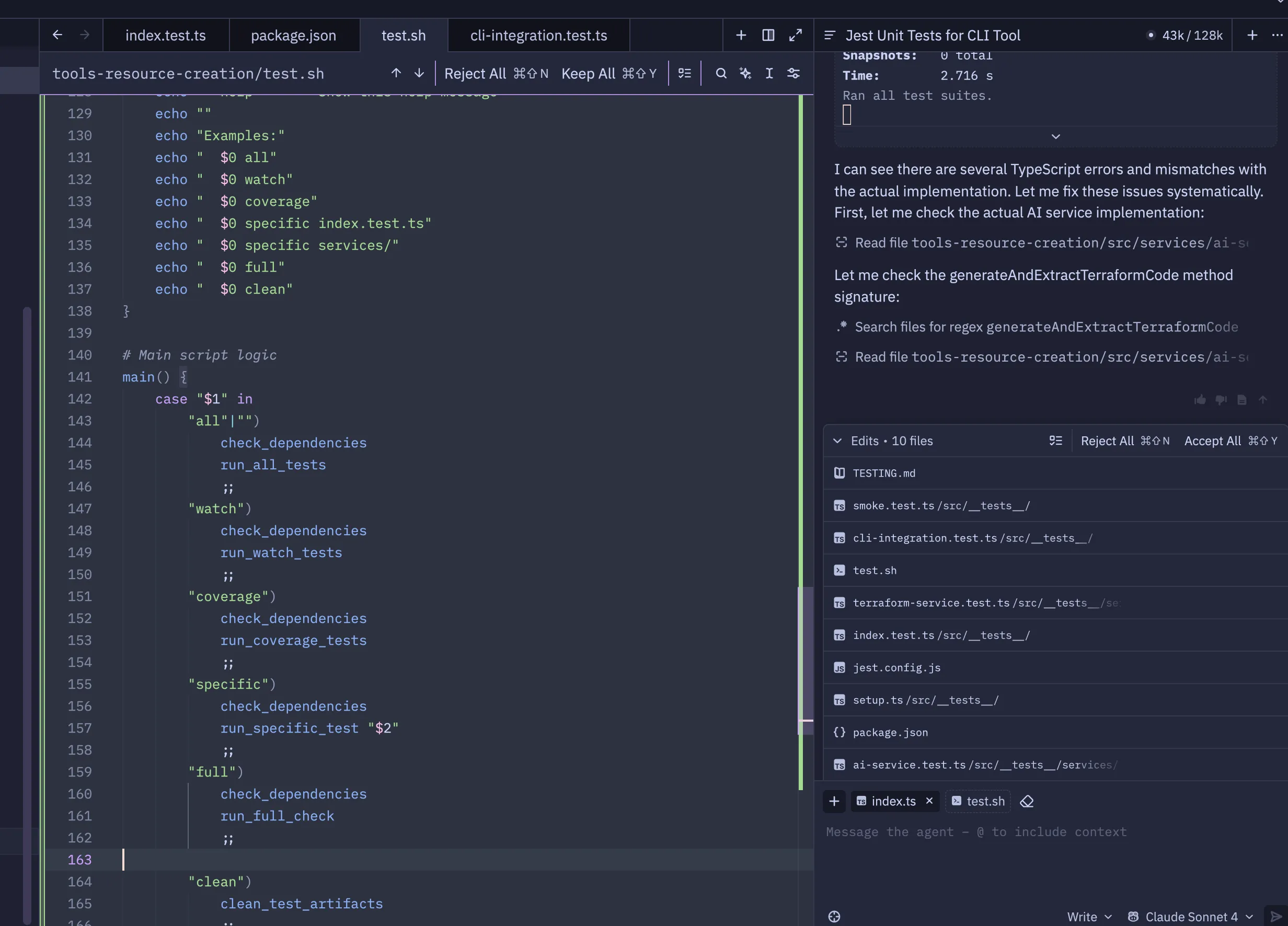
A few seconds later even the Agent expressed its surprise. I can see there are several TypeScript errors and mismatches, it told me. Let me fix these issues systematically.
I took a few seconds to ponder what this meant.
I decided that this isn’t going to end well. At this point the count was approaching 43k and I made the decision to click the stop button.
All Input, No Output
The tokens increasing in their thousands every few seconds was fascinating. I knew that LLMs can devour tokens during coding tasks, but I’d never seen a counter of them being used in real-time. That’s when this routine task became an experiment. After the initial shock, and when I had come to terms with burning through 40k tokens to produce non-functioning code, I chuckled to myself. I don’t think it cost too much money.
I’m not sure who said the famous quote: “garbage in, garbage out”. George Washington maybe? But this is another reminder that even in 2025 (and probably forever) the quote is true. I was going to use “In the age of AI” there. But it’s a horrible, unimaginative and nauseating phrase. In 20 years from now, are we really going to say “2025 sure was the age of AI!”. Come on now.
LLMs are powerful, but they need guidance. My instructions to the LLM were unclear and very ambiguous. I was hoping that I didn’t need to be too explicit. But I trusted the LLM too much and assumed it would be able to figure out a lot of things on its own.
I think a coding-focused AI tool (like Claude Code) could do a better job. I’m trying out using Gemini 2.5 Pro for coding tasks at the moment, and the responses feel more helpful. It has a different personality. It gets a bit annoying sometimes. Most of my questions get overly enthusiastic responses such as “Of course! Let’s break down what this error means.” Gemini 2.5 Pro outputs a wall of text explanation mixed in with the code. It is good to help fully understand the problem. But 80% of the time I just want to see the code suggestions (like Claude Sonnet) and not be distracted with the politeness and clammy platitudes that Gemini gives.
AI/LLM coding tools are improving faster than you pressing CMD+Tab during a company-wide screen-share when you accidentally show the private Slack channel where you discuss your colleague’s coding abilities using only memes. 6 months ago, coding assistance using an LLM was helpful. Today, Claude Code can do some really impressive stuff. It’s always necessary to double-check the output too. Something I use it for is prototyping something, or making something simple in a few minutes and that I don’t need to work flawlessly. It allows me to test out an idea. Maybe a client/server website, or an IAC template for a cloud resource.